Settings and accessibility
The store front lists adjustable difficulty, save anytime, subtitle options, colour alternatives, keyboard-only and mouse-only modes, playable without timed input, stereo sound and custom volume. Most sit in the settings menu after the prologue.
Psycho-Sleuth ships with a longer accessibility feature list than most indie visual novels, and it is worth going through one by one, because three of them change how the game plays rather than how it looks.
The full list
Every entry below is a Steam store feature tag, so it reflects what the developers chose to advertise:
| Feature | What it does in practice |
|---|---|
| Adjustable Difficulty | More than one difficulty setting, affecting the debate timers and tolerance |
| Save Anytime | Manual saves at any point, not just at chapter breaks |
| Subtitle Options | Subtitle size and visibility are configurable |
| Colour Alternatives | Colour-vision alternates for the UI and the puzzle screens |
| Keyboard Only Option | The entire game playable without a mouse |
| Mouse Only Option | The entire game playable with a single pointer |
| Playable without Timed Input | The timed sections can be handled without a hard clock |
| Stereo Sound | Two-channel audio mix |
| Custom Volume Controls | Separate sliders for music, voice and effects |
| Full Controller Support | Start to finish with a pad, with correct prompts |
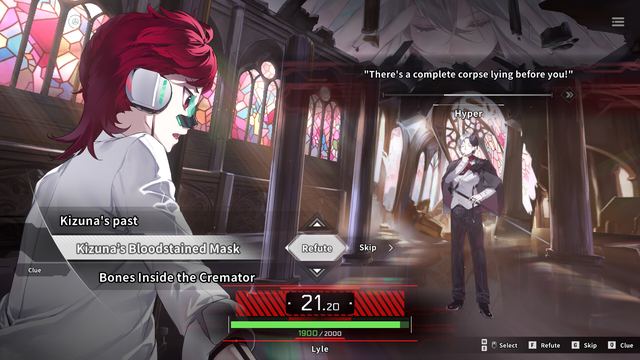
Three of these — adjustable difficulty, no timed input, and save anytime — are doing real work in a game built around a countdown. The debate timer is the main source of failure, and the store lists two separate ways to soften it.
The Gore Display toggle
Not on the store tag list, but documented in the official streaming guidelines: the game displays gore in full by default, and the developers point streamers at a Gore Display option under Settings to reduce it.
That is the one setting most people will change before their first chapter. It is also the setting players have been asking about on the Steam hub since launch, which suggests it is not in an obvious place in the menu. Look under the display or content settings rather than audio.
Where the difficulty setting lives
The difficulty option does not appear in the store screenshots, and the game opens with a prologue before you reach a menu. Expect to find it either on the title screen under New Game or in the settings menu once the prologue ends.
What it changes: given that the failure state is a timed argument, difficulty almost certainly adjusts the debate clock, the number of statements, or both. The game does not publish the exact numbers, and this site does not invent them. If you are struggling, drop the difficulty before you drop the game — the story is the point.
Playing with one input device
Both keyboard-only and mouse-only modes are listed, which is uncommon and useful:
Keyboard only suits players who use a switch or a head-pointer that emulates keys. Debate selection is W/S with F to refute and Q for clues, all reachable without moving a hand.
Mouse only suits trackpad play on a laptop. Everything from examining a scene to choosing a statement can be clicked.
Neither mode is documented in detail on the store, so the first thing to do is check that the mode you need is actually honoured in the first debate — that is where the input paths diverge.
Colour vision
Colour Alternatives is listed as a feature, which in a game with red evidence highlights and coloured clue tags is not cosmetic. If you have deuteranopia or protanopia, turn it on before Chapter 1 rather than after a puzzle goes wrong; the alternate palette usually changes how clue categories are distinguished.
Subtitle and text options
The subtitle options were expanded during development in response to feedback: story animations now pause for player-controlled subtitle advance, so text cannot scroll past you during a cutscene. Combined with the dialogue LOG, that means you can always get back to a line you missed.
If you play on a small laptop screen, the subtitle size setting is the first thing to change — the game's UI is designed for 1920×1080, and at 1366×768 the default text is small.
What is not listed
There is no screen-reader mode, no full audio description track, and no colour-blind simulation for the art itself (only UI colour alternatives). The game has not been submitted to any accessibility review board that publishes a score.
That is worth saying plainly if accessibility is a purchase condition rather than a preference. The feature list is good for the genre but it is not a AAA accessibility suite.
Where to go next
Deck and controller support covers the input side if you are playing handheld or with a pad, and known issues has the reports about the gore toggle and controller recognition that came up in launch week.
Features listed are the Steam store tags as displayed on 6 November 2026; the gore toggle and its default state are from the official streaming guidelines announcement.
A first-ten-minutes checklist
If you only change three settings before you start, change these:
| Order | Setting | Why first |
|---|---|---|
| 1 | Gore Display | The default is full gore; decide before the first body |
| 2 | Subtitle size | The UI is built for 1920×1080; smaller screens need bigger text |
| 3 | Difficulty | The debate timer is the failure state; set it before Chapter 1, not after |
Everything else can wait until you know how the game plays. Hotkeys, volume and colour alternatives are all reachable from the pause menu mid-chapter, and none of them change what you can solve.